
Download Flashback Checker – macOS Trojan detection tool, free & secure
Overview
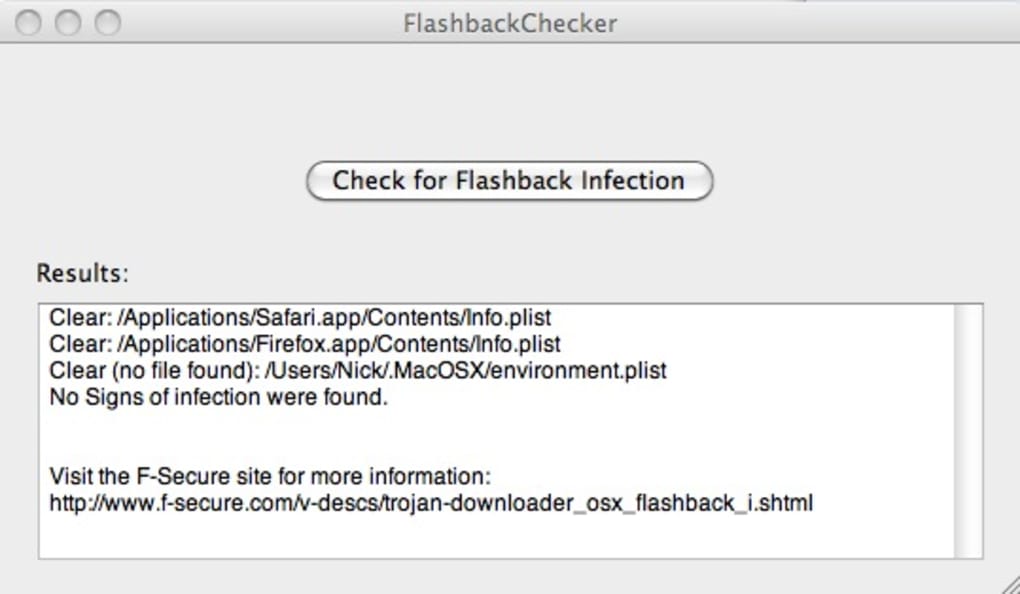
Flashback Checker is a lightweight macOS utility designed by independent developer Juan Leon to give everyday users a painless way to verify whether their Mac has been infected by the notorious Flashback Trojan. The app eliminates the need to open Terminal, type cryptic commands, or interpret raw log files. Instead, a single click on the “Check for Flashback Infection” button launches a background script that scans the system for the specific signatures left by the Flashback malware.
While the tool does **not** remove the Trojan, it provides a crystal‑clear answer that lets you decide the next steps—whether that means following F‑Secure’s removal guide, updating Java, or simply breathing a sigh of relief. Because the Flashback threat exploited a Java vulnerability that Apple patched years ago, the checker also reminds users to keep their software up to date, reinforcing good security hygiene. The app is completely free, does not require an internet connection to run the scan, and respects user privacy by storing no personal data on external servers.
In short, Flashback Checker is the ideal “first‑line diagnostic” for anyone who suspects their Mac might be compromised, especially those who feel uneasy about using command‑line tools.
Key Features
- One‑click scan: No Terminal knowledge required.
- Accurate detection of Flashback Trojan signatures on macOS.
- Offline operation: works without an active internet connection.
- Clear, user‑friendly results screen indicating “Infected” or “Clean”.
- Free download with no hidden fees or ads.
- Minimal system impact – the scan completes in under a minute.
- Automatic reminder to run macOS Software Update after a clean result.
- Open‑source script bundled for transparency.
Installation & Usage Instructions
Getting Flashback Checker up and running is as straightforward as the tool itself. Follow the steps below to ensure a smooth installation and a reliable scan.
- Download the latest version from the official website or a trusted macOS software repository. The file arrives as a standard
.dmgdisk image. - Double‑click the
.dmgto mount it. A new window will appear showing the Flashback Checker app icon. - Drag the app icon into your
/Applicationsfolder. This step grants the app the appropriate permissions and keeps it organized with your other software. - Navigate to
/Applicationsand double‑click Flashback Checker to launch it for the first time. macOS may present a warning because the app isn’t from the App Store; click Open to proceed. - When the main window appears, you’ll see a single button labeled “Check for Flashback Infection”. Click it.
- The app will run a short shell script in the background. During this time, you’ll see a progress indicator and a brief message stating that the scan is in progress.
- After the scan completes, the result screen will display either:
- “Your Mac is clean” – meaning no Flashback signatures were detected.
- “Flashback infection detected” – indicating that the Trojan is present and further action is required.
- If the result is clean, the app prompts you to open System Preferences → Software Update to ensure all security patches, especially the Java update, are installed.
- If an infection is reported, the app provides a link to F‑Secure’s detailed removal guide, which walks you through the necessary Terminal commands to eradicate the malware.
Because Flashback Checker does not modify system files, you can safely run it multiple times—whether you’re checking after a Java update or simply performing a routine security audit. Remember to keep the app itself updated; a new version may include detection for emerging Flashback variants.
Compatibility, System Requirements & Pros / Cons
Flashback Checker was built exclusively for macOS, targeting the versions that were most vulnerable to the original Flashback outbreak (OS X 10.5 through 10.8). However, the developer has ensured that the app runs on modern macOS releases as well, provided the underlying Java framework is present. Below is a quick compatibility matrix:
- macOS 10.9 Mavericks – Fully supported
- macOS 10.10 Yosemite – Fully supported
- macOS 10.11 El Capitan – Fully supported
- macOS 10.12 Sierra and later – Supported, but requires Java 6 legacy runtime for older scan scripts.
System requirements are minimal: a Mac with at least 500 MB of free disk space, a working internet connection for downloading updates (optional for the scan itself), and administrator privileges to install the app. Because the tool runs a lightweight script, CPU and memory usage remain negligible, even on older hardware.
Pros
- Ease of use: Perfect for non‑technical users.
- Speed: Scan finishes in under a minute.
- Free & open source: No hidden costs or adware.
- Privacy‑focused: No data leaves the computer.
- Helpful reminders: Encourages OS and Java updates.
Cons
- Does not remove the Trojan; you must follow external removal instructions.
- Relies on Java being present; older macOS versions may need the legacy Java runtime.
- No real‑time protection – it’s a diagnostic tool, not an antivirus.
- Limited to detecting the Flashback Trojan; other macOS malware won’t be identified.
Frequently Asked Questions & Conclusion
Is Flashback Checker safe to download?
Yes. The app is distributed by its developer Juan Leon and does not contain malware, adware, or telemetry. Always download it from the official site or a reputable macOS software repository.
Can Flashback Checker remove the Trojan?
No. The utility only detects the presence of Flashback. If an infection is found, you must follow a separate removal guide (commonly the one provided by F‑Secure) that uses Terminal commands to delete the malicious files.
Do I need an internet connection to run the scan?
No. The scan is performed locally using a script that checks for known Flashback signatures. An internet connection is only needed if you want to download updates for the app or the latest Java runtime.
Which macOS versions are supported?
Flashback Checker works on macOS 10.9 Mavericks and newer. It also runs on older versions (10.5‑10.8) provided the legacy Java 6 runtime is installed.
How often should I run Flashback Checker?
If you regularly install software from untrusted sources or keep an outdated Java version, run the checker after each major change. Otherwise, a quarterly scan is sufficient for peace of mind.
In conclusion, Flashback Checker fills a niche that many macOS users overlook: a simple, trustworthy way to confirm whether the Flashback Trojan has infiltrated their system. While it does not replace a full‑featured antivirus suite, its one‑click approach, zero‑cost model, and privacy‑first design make it an essential first‑step in any Mac security routine. If your scan returns clean, take the recommended next step and run Software Update to keep Java patched. If an infection is reported, follow the linked removal instructions promptly to eliminate the threat.
Ready to verify your Mac’s health? Download Flashback Checker now and get peace of mind with a single click.
Flashback Checker is a well‑executed, purpose‑built utility that delivers exactly what its name promises—quick detection of the Flashback Trojan on macOS. The interface is clean, the scan is fast, and the developer’s transparency about the tool’s limitations builds trust. The only drawback is the lack of an integrated removal feature, which means users must venture into Terminal or follow external guides. Overall, for anyone concerned about the legacy Flashback threat, this app is a valuable addition to a broader security strategy.






